Remote verification from your customer’s phone
Know the photos are real, without sending someone.
For claims, deliveries, check-ins and site inspections: your customer opens a link and takes the photos live on their phone. You get them back with a decision and the checks behind it.
Free to try in test mode. Nobody real is contacted until you go live.
What your customer sees
Built for the checks you do today
Insurance
Property and auto claims: the policyholder shows the damage from their phone, today, instead of waiting for an adjuster.
Template: Property claim: remote inspection
Hospitality and rentals
Guest self check-in: the guest shows the building and the door from their phone, without someone there to meet them.
Template: Remote check-in
Logistics and delivery
Proof of delivery and parcel damage, captured at the doorstep with the time and place.
Template: Proof of delivery
Lending and collateral
Construction draws and collateral checks, without a site visit.
Template: Construction draw inspection
Why it’s hard to fake
A photo alone proves little. To get a fake past Verifit, someone must beat each of these; a check they stop from running shows as Skipped.
Taken live
Photos are shot in our live camera screen. A gallery upload is offered only if the camera fails or is refused, and the checks that need the live camera show as Skipped.
Not a photo of a screen
Extra frames around each live photo reveal a screen or a printout: pixel grids, refresh bands, a scene moving like one flat sheet.
Sealed on arrival
Each capture is signed with a C2PA content credential when it reaches us, and live captures are timestamped by an independent time authority.
Not edited
After signing, changing a single pixel breaks the credential and the tamper check fails.
Right time
The phone's capture time is checked against the moment we sign it; a clock set forward is flagged.
Right place
If you set a site, the capture must be inside it. Fake-location apps can show up as frozen, too-perfect or impossible fixes.
A real phone
Where device checks are on, automation tools and tampered browsers are flagged.
Not reused
The same photo, or a resized copy of one, sent to your workspace before is flagged.
Each flow sets, check by check, whether a failure rejects the capture or sends it to a person; the report names the rule that decided.
And you can prove it later
One link, one submission
Each link belongs to one verification, expires, and cannot be submitted twice.
A report with its reasons
Every decision lists the checks and the rule behind it, and the report carries a SHA-256 fingerprint anyone can recompute and compare with ours.
Where your flow asks for it, an ID document and selfie check with liveness confirms the person (needs the ID check enabled; test mode simulates it).
What it does not prove
- That the scene itself is honest: staged or earlier damage still looks real to a camera.
- Who held the phone, unless your flow includes the ID check.
- A claim's address, unless you set a site for the step. Our insurance claim templates prove when the photos were taken, not where the policy is.
- AI-generated image detection is a Preview: it returns sample results and is never used in live decisions.
- A check that gets no signal (location refused, no motion sensors, a file from the gallery) is shown as Skipped in the report, never as passed.
- Until our signing certificate is on the C2PA trust list, other C2PA viewers show the issuer as unknown; our tamper check still verifies the pixels.
- The report's fingerprint is a checksum, not a signature: it shows a change when compared with the copy Verifit keeps.
- Checks lower the odds of an undetected fake; they are evidence, not a guarantee. Anything sent to review gets a person's decision.
See the whole thing in about a minute
1 / 9 · Insurance claims and inspections
The problem
Sending an adjuster takes days. Claim photos are easy to fake.
Read as text
- The problem. Sending an adjuster takes days. Claim photos are easy to fake.
- A person travelling to check in person, crossed out, next to a phone.
- Your customer gets a link. You send your customer a link. Nothing to install.
- A text message with the link, then: The link's first screen for Property claim: remote inspection: who is asking, what to do, and a Start button.
- They shoot on their phone. They follow your short checklist and shoot with the live camera.
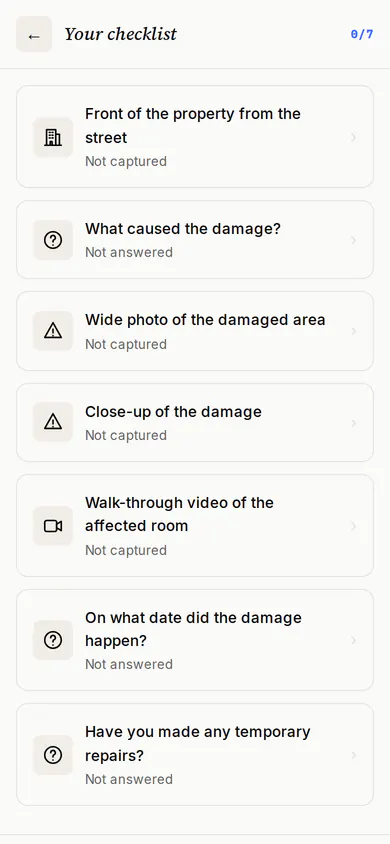
- The checklist of photos to take for Property claim: remote inspection.
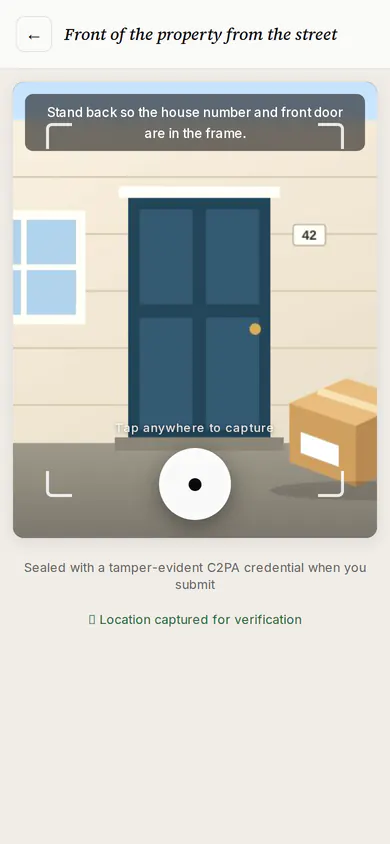
- The live camera screen, with a tip for the photo being taken.
- The confirmation screen after the photos are sent.
- What Verifit checks while they shoot. While they shoot, Verifit records time, place, motion and extra frames around each photo.
- The live camera screen, with a tip for the photo being taken. Around it: Time, Place, Motion, Extra frames.
- A fake gets caught. Now a faked capture, like a photo of a screen. The checks catch it.
- A phone aimed at a computer screen.
- Capture time: Failed
- Re-photographed image: Failed
- Device integrity: Warning
- Location spoofing: Warning
- From a real test run of a simulated fake. Every check that flagged it is listed.
- The decision and the reasons. You get a decision with the reasons, check by check.
- Rejected. The policy decided reject because Re-photographed image failed.
- Capture time failed: Client capture time is 7200s ahead of the server — impossible for a fresh capture (clock manipulation / replayed timestamp).
- Re-photographed image failed: Screen/printout recapture indicators: periodic pixel-grid energy AND rigid planar inter-frame motion.
- Risk score in the review band: Risk score 0.51 is between the approve (0.3) and reject (0.7) thresholds.
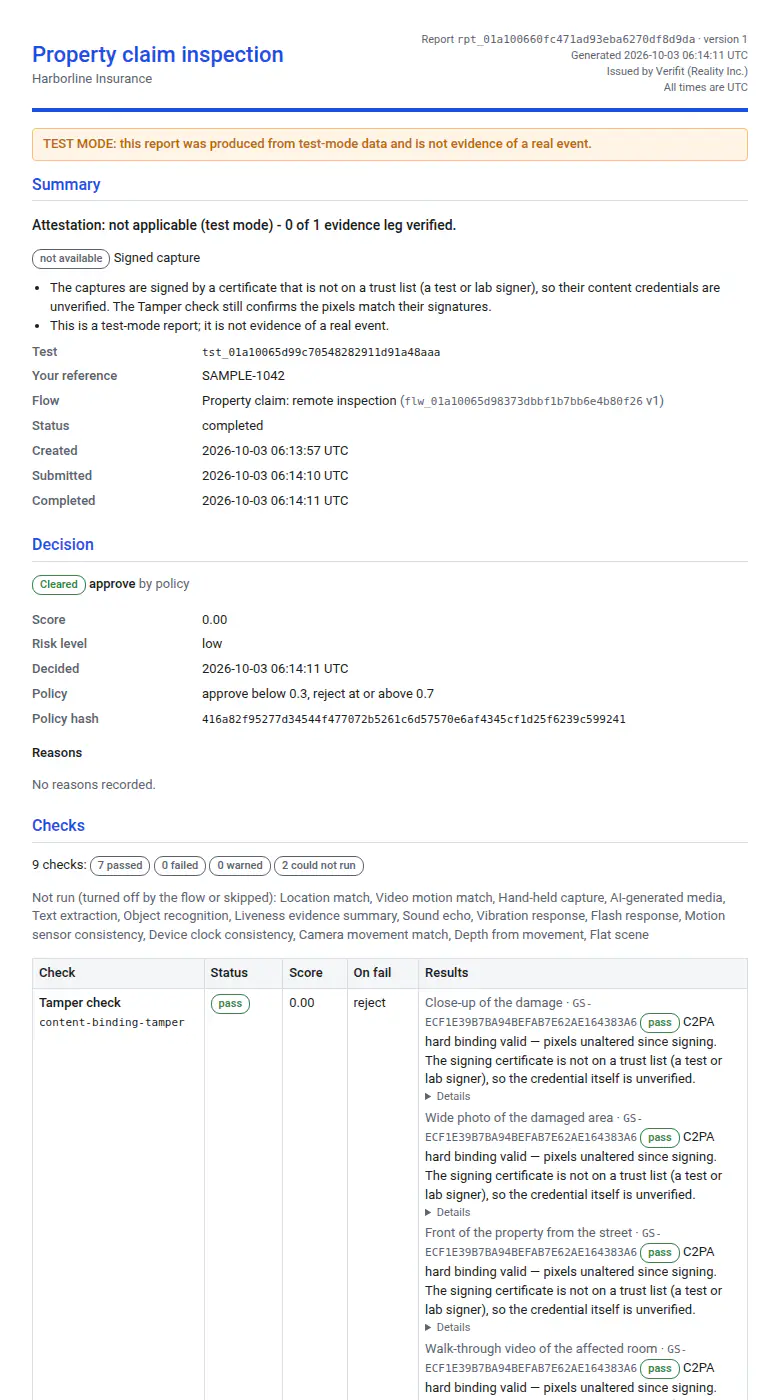
- A report you can keep. Change one word of the report and it no longer matches the fingerprint we keep.
- The top of the report for the faked capture: rejected, with the checks that failed.
- Fingerprint sha256:cc94…2faf
- Photos signed · timestamped
- Make it yours. Your logo and colours on every screen. Verifit still seals the evidence.
- The link's first screen for Property claim: remote inspection: who is asking, what to do, and a Start button.
- The same first screen in the colours of Harborline Insurance, a sample brand. (Sample brand: Harborline Insurance)
- Your turn. Send your first test. One click, sample photos, nobody real contacted.
1 / 9 · Hospitality and rentals
The problem
Checking guests in needs someone on site. A photo proves little.
Read as text
- The problem. Checking guests in needs someone on site. A photo proves little.
- A person travelling to check in person, crossed out, next to a phone.
- Your customer gets a link. You send your customer a link. Nothing to install.
- A text message with the link, then: The link's first screen for Remote check-in: who is asking, what to do, and a Start button.
- They shoot on their phone. They follow your short checklist and shoot with the live camera.
- The checklist of photos to take for Remote check-in.
- The live camera screen, with a tip for the photo being taken.
- The confirmation screen after the photos are sent.
- What Verifit checks while they shoot. While they shoot, Verifit records time, place, motion and extra frames around each photo.
- The live camera screen, with a tip for the photo being taken. Around it: Time, Place, Motion, Extra frames.
- A fake gets caught. Now a faked capture, like a photo of a screen. The checks catch it.
- A phone aimed at a computer screen.
- Capture time: Failed
- Re-photographed image: Failed
- Device integrity: Warning
- Location spoofing: Warning
- From a real test run of a simulated fake. Every check that flagged it is listed.
- The decision and the reasons. You get a decision with the reasons, check by check.
- Rejected. The policy decided reject because Re-photographed image failed.
- Capture time failed: Client capture time is 7200s ahead of the server — impossible for a fresh capture (clock manipulation / replayed timestamp).
- Device integrity warned: No device-intelligence visitor id attached to this capture.
- Re-photographed image failed: Screen/printout recapture indicators: periodic pixel-grid energy AND rigid planar inter-frame motion.
- A report you can keep. Change one word of the report and it no longer matches the fingerprint we keep.
- The top of the report for the faked capture: rejected, with the checks that failed.
- Fingerprint sha256:46aa…b5be
- Photos signed · timestamped
- Make it yours. Your logo and colours on every screen. Verifit still seals the evidence.
- The link's first screen for Remote check-in: who is asking, what to do, and a Start button.
- The same first screen in the colours of Lakeshore Stays, a sample brand. (Sample brand: Lakeshore Stays)
- Your turn. Send your first test. One click, sample photos, nobody real contacted.
1 / 9 · Logistics and delivery
The problem
"Delivered" is one tap on a screen. Disputes need real proof.
Read as text
- The problem. "Delivered" is one tap on a screen. Disputes need real proof.
- A person travelling to check in person, crossed out, next to a phone.
- Your customer gets a link. You send your customer a link. Nothing to install.
- A text message with the link, then: The link's first screen for Proof of delivery: who is asking, what to do, and a Start button.
- They shoot on their phone. They follow your short checklist and shoot with the live camera.
- The checklist of photos to take for Proof of delivery.
- The live camera screen, with a tip for the photo being taken.
- The confirmation screen after the photos are sent.
- What Verifit checks while they shoot. While they shoot, Verifit records time, place, motion and extra frames around each photo.
- The live camera screen, with a tip for the photo being taken. Around it: Time, Place, Motion, Extra frames.
- A fake gets caught. Now a faked capture, like a photo of a screen. The checks catch it.
- A phone aimed at a computer screen.
- Capture time: Failed
- Re-photographed image: Failed
- Device integrity: Warning
- Location spoofing: Warning
- From a real test run of a simulated fake. Every check that flagged it is listed.
- The decision and the reasons. You get a decision with the reasons, check by check.
- Rejected. The policy decided reject because Re-photographed image failed.
- Capture time failed: Client capture time is 7200s ahead of the server — impossible for a fresh capture (clock manipulation / replayed timestamp).
- Re-photographed image failed: Screen/printout recapture indicators: periodic pixel-grid energy AND rigid planar inter-frame motion.
- Risk score in the review band: Risk score 0.51 is between the approve (0.3) and reject (0.7) thresholds.
- A report you can keep. Change one word of the report and it no longer matches the fingerprint we keep.
- The top of the report for the faked capture: rejected, with the checks that failed.
- Fingerprint sha256:45ab…00ed
- Photos signed · timestamped
- Make it yours. Your logo and colours on every screen. Verifit still seals the evidence.
- The link's first screen for Proof of delivery: who is asking, what to do, and a Start button.
- The same first screen in the colours of Parcel Logistics, a sample brand. (Sample brand: Parcel Logistics)
- Your turn. Send your first test. One click, sample photos, nobody real contacted.
1 / 9 · Lending, collateral and dealers
The problem
Releasing a draw means a site visit. Progress photos get recycled.
Read as text
- The problem. Releasing a draw means a site visit. Progress photos get recycled.
- A person travelling to check in person, crossed out, next to a phone.
- Your customer gets a link. You send your customer a link. Nothing to install.
- A text message with the link, then: The link's first screen for Construction draw inspection: who is asking, what to do, and a Start button.
- They shoot on their phone. They follow your short checklist and shoot with the live camera.
- The checklist of photos to take for Construction draw inspection.
- The live camera screen, with a tip for the photo being taken.
- The confirmation screen after the photos are sent.
- What Verifit checks while they shoot. While they shoot, Verifit records time, place, motion and extra frames around each photo.
- The live camera screen, with a tip for the photo being taken. Around it: Time, Place, Motion, Extra frames.
- A fake gets caught. Now a faked capture, like a photo of a screen. The checks catch it.
- A phone aimed at a computer screen.
- Capture time: Failed
- Re-photographed image: Failed
- Device integrity: Warning
- Location spoofing: Warning
- From a real test run of a simulated fake. Every check that flagged it is listed.
- The decision and the reasons. You get a decision with the reasons, check by check.
- Rejected. The policy decided reject because Re-photographed image failed and the risk score is at or above the reject threshold.
- Capture time failed: Client capture time is 7200s ahead of the server — impossible for a fresh capture (clock manipulation / replayed timestamp).
- Re-photographed image failed: Screen/printout recapture indicators: periodic pixel-grid energy AND rigid planar inter-frame motion.
- Risk score at or above the reject threshold: Risk score 0.51 is at or above the reject threshold 0.5; Re-photographed image contributed 0.507, Capture time contributed 0.48, Location spoofing contributed 0.275.
- A report you can keep. Change one word of the report and it no longer matches the fingerprint we keep.
- The top of the report for the faked capture: rejected, with the checks that failed.
- Fingerprint sha256:6d14…95b1
- Photos signed · timestamped
- Make it yours. Your logo and colours on every screen. Verifit still seals the evidence.
- The link's first screen for Construction draw inspection: who is asking, what to do, and a Start button.
- The same first screen in the colours of Bayview Lending, a sample brand. (Sample brand: Bayview Lending)
- Your turn. Send your first test. One click, sample photos, nobody real contacted.
Send your first test today.
Pick your industry, see your customer’s screens, and read a real report in under ten minutes.